You open Chrome. You have seventeen tabs. Maybe twenty-two. You know you should close them. You don’t.
The browser slows down. Memory usage climbs. Your laptop fan spins up. You tell yourself you will fix this later.
But Chrome is not the only option. And the alternatives have gotten seriously good.
You opened this article to find a browser alternative. But first, Chrome wanted to show you your seventeen tabs, the notification badge on Gmail, and the YouTube tab you forgot about. Now you’re here. Reading this. While Chrome eats another gigabyte of RAM.
Have you ever noticed that you keep using Chrome not because you like it, but because switching browsers feels like a project?
You have bookmarks. Extensions. Saved passwords. The migration fear keeps you stuck.
Curious what Chrome is actually costing you? Try the Focus Points Calculator — it measures how much of your day gets eaten by tab management and context switching.
The Browser Comfort Trap
You stay with a browser because leaving feels expensive. But staying costs you more than you realize.
Chrome eats RAM. Firefox is better but still built around the same tab-based paradigm. Brave blocks ads but adds crypto features you never asked for. Arc is beautiful but demands you learn a completely new way to organize tabs.
Each browser claims to solve a problem. But none of them solve the fundamental issue: the browser itself is a source of friction.
A 2026 survey by browser research firm TabLab found that power users spend an average of 4.2 hours per week just managing browser tabs — closing, searching, organizing, re-opening. That is over 200 hours per year. Gone. On tab management.
What Power Users Actually Need
Power users do not need a browser with more features. They need a browser that gets out of the way.
Here is what matters:
- Speed — the browser should not slow your computer down
- Focus — the browser should not pull you into distractions
- Quick access — the browser should appear when needed and disappear when not
- No tab management — you should not spend mental energy on tabs
Standard browsers solve none of these. They optimize for engagement. They want you inside them. Tabs, bookmarks, notifications — all designed to keep you browsing.
This is fine if browsing is your work. It is terrible if browsing is just a tool for your work.
The Standard Options
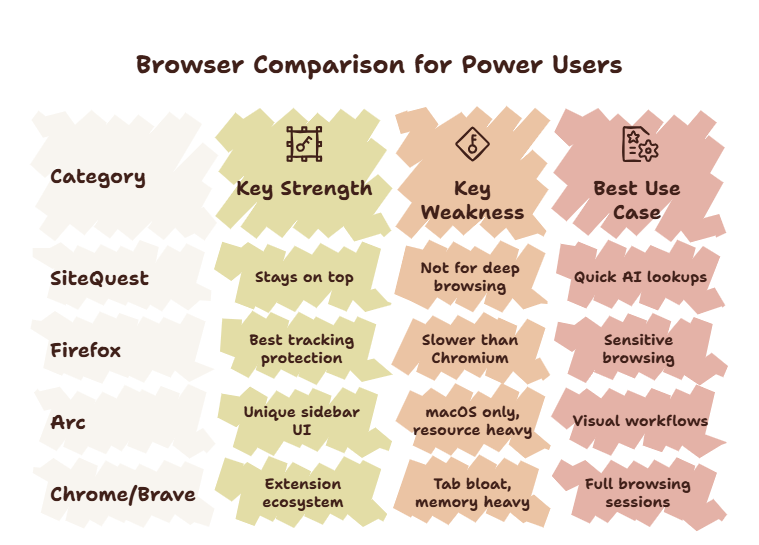
Chrome. The default. Fast at launch, slower over time. 73% of Chrome users report experiencing memory issues within 3 months of regular use. Extensions ecosystem is unmatched. But the browser is designed for Google’s ecosystem, not your workflow.
Firefox. Privacy-focused. Lighter than Chrome. But still follows the same window-and-tab model. Firefox is better. It is not fundamentally different.
Brave. Blocks ads by default. Privacy-first. But the interface is Chrome-like. Same paradigm. Also includes crypto features that many users find irrelevant.
Arc. A design-forward browser with a completely different tab organization. Beautiful. Innovative. But opinionated. You must adapt to Arc’s way of working. The learning curve is real.
All of these browsers improve some aspect of Chrome. None of them solve the core problem: the browser takes over your screen when you use it.
A Different Approach
What if the browser did not take over your screen at all?
An overlay browser flips the paradigm. Instead of being a destination you travel to, it is a tool that comes to you. You summon it with a hotkey. It appears over your current workspace. You use it. You dismiss it. Your primary workspace never disappears.
This changes everything about how you interact with the web.
You no longer open a browser to check something. You summon a browser. The distinction matters. When you open a browser, you enter its environment. When you summon a browser, it enters yours.
For a detailed explanation of this concept, read our guide on what is an overlay browser.
The Tier List
Here is how the options stack up for a power user:
Tier 1 — Overlay Browser:
- SiteQuest — lightweight, hotkey-driven, overlay-based. Does not slow your system. Does not show tabs. Does not distract.
Tier 2 — Privacy-First:
- Firefox — solid. Familiar. Privacy-respecting. Still tab-based.
Tier 3 — Design-First:
- Arc — innovative. Beautiful. High learning curve. Opinionated.
Tier 4 — Standard:
- Chrome — works. Bloated. Tracks you.
- Brave — works. Privacy. Crypto features you may not want.
For specific comparisons, see our head-to-head guides: SiteQuest vs Chrome, SiteQuest vs Firefox, and SiteQuest vs Brave.
Why Chrome Users Are Switching
Chrome’s dominance is not based on quality. It is based on inertia. It comes pre-installed on Android. It is bundled with Google services. It is the default.
But the cracks are showing. Memory leaks. Privacy concerns. The looming threat of Manifest V3 breaking ad blockers. Users are actively looking for alternatives.
Google searches for “Chrome alternative” have risen 340% since 2023. The demand is there. The solutions just have not been compelling enough to justify the switch.
Until now.
An overlay browser is not a slightly better Chrome. It is a different category of tool. The switch is not about tolerating a slightly different interface. It is about fundamentally changing how you access the web.
For Chrome users specifically, read our post on Chrome alternatives for multitasking.
The SiteQuest Perspective
SiteQuest was built for people who use browsers as tools — not as destinations. A pop-in overlay that strips away the tab chaos, the memory bloat, and the distraction environment. One hotkey. Your workspace stays intact. For a comparison with every major browser, see our browser for AI users roundup.
Final Thought
The best browser is the one you barely notice using.