You switched to Firefox because you care about privacy. Good move. Firefox is the only major browser not built by an ad company.
But here is a question: does Firefox actually make you more productive?
It protects your data. It blocks trackers. It respects your privacy. All excellent.
But when you open Firefox to check something — a quick reference, a doc page, an AI tool — you still enter a full browser environment. Tabs. Bookmarks. History. The same paradigm as every other browser.
You opened this article to compare SiteQuest and Firefox. But first, you had to open a browser — maybe Firefox itself — to find this page. Now you’re here. Reading this. While Firefox quietly waits with all its tabs, containers, and bookmarks ready to pull you in.
Have you ever noticed that switching to Firefox for a quick lookup still takes you out of your flow — even with all the privacy benefits?
Privacy protects your data. It does not protect your focus.
Curious what those quick lookups are costing you? Try the Focus Points Calculator — it measures how much of your day gets eaten by context switching.
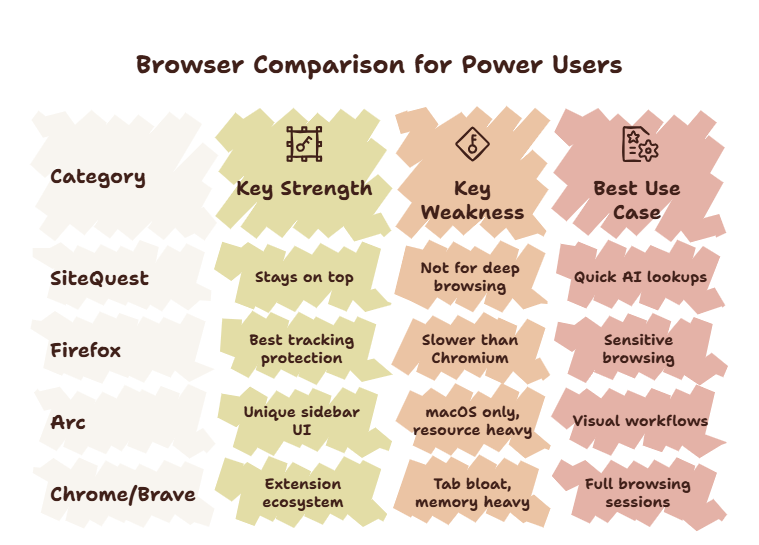
The Firefox Strength
Firefox is genuinely good. Mozilla has done important work keeping the web open. Container tabs are innovative. Privacy protection is best-in-class. Performance has improved dramatically.
For people who prioritize privacy, Firefox is the right choice.
But Firefox and SiteQuest serve different purposes. They are not direct competitors. They are tools for different jobs.
Where Firefox Falls Short
Firefox optimizes for privacy. It does not optimize for minimizing disruption to your workflow.
When you need to check something quickly — a documentation page, an AI response, a configuration value — Firefox still requires you to:
- Leave your current application
- Find the Firefox window (or open a new one)
- Navigate to the page
- Read the information
- Return to your application
- Rebuild context
Each step is small. Together they add up. If you check things 50 times a day, you lose significant time to the process of leaving and returning.
Firefox also shares the tab problem with every traditional browser. Tabs accumulate. They sit in your browser consuming mental bandwidth. Even with container tabs, you still manage the tab bar.
Where SiteQuest Wins
SiteQuest is not a Firefox replacement. It is a complement — one that handles the quick-lookup use case that Firefox was not designed for.
With SiteQuest:
- Summon the overlay with a hotkey — no window hunting
- The overlay appears over your current workspace — no context switch
- Use Firefox for privacy-sensitive browsing sessions
- Use SiteQuest for quick lookups, AI access, and reference checks
This two-browser strategy gives you the best of both worlds. Firefox for privacy. SiteQuest for speed.
SiteQuest vs Firefox Comparison
| Feature | Firefox | SiteQuest |
|---|---|---|
| Privacy | Excellent — built-in tracking protection | Underlying browser engine handles security |
| Launch method | Click or dock | Hotkey |
| Screen impact | Full window | Overlay — workspace stays visible |
| Tab management | Required | None |
| Best for | Privacy-sensitive browsing, research | Quick lookups, AI tools, reference |
| Context switch cost | High — leaves current app | Minimal — overlay on current workspace |
| AI tool access | Browser tab | One hotkey away |
When To Use Firefox
Keep Firefox for:
- Privacy-sensitive browsing — sensitive searches, research on personal topics
- Full browsing sessions — reading articles, shopping, social media
- Container-based workflows — Firefox’s multi-account containers are genuinely useful
- Extension-specific tasks — Firefox has a solid extension ecosystem
Use SiteQuest alongside Firefox for:
- Quick AI lookups — ChatGPT, Claude, Gemini in an overlay
- Documentation — API docs, reference pages, code lookups
- Quick facts — definitions, conversions, config values
- Any “check and return” task — where the goal is to find information and get back to work
For a broader look at all browser options, read our power user browser guide.
Final Thought
Let Firefox protect your privacy. Let SiteQuest protect your focus. You need both.