You installed Brave because you were tired of ads. It worked. Websites loaded faster. No pop-ups. No tracking. Clean.
But over time, something felt different. Brave is fast. But it still operates like a traditional browser. Tabs. Windows. Bookmarks. The same paradigm, just with ads stripped out.
And Brave adds things you never asked for. A crypto wallet. BAT rewards. A built-in VPN upsell. Features accumulate.
Have you ever noticed that Brave keeps adding features you do not use?
You opened this article to compare SiteQuest and Brave. But first, you had to open a browser — maybe Brave itself — to find this comparison. Now you’re here. Reading this. While a crypto wallet you never asked for sits in your browser.
The browser started as a simple ad-blocking alternative. Now it is a platform with crypto, wallets, and a reward system. Feature creep is real.
The Brave Proposition
Brave assumes your biggest browser problem is ads and trackers. Block those, and you have solved browsing.
This premise is correct for many people. Brave is genuinely faster than Chrome because it is not loading ad scripts and tracking pixels. Privacy is built in. You do not need extensions for ad blocking or tracking protection.
Brave is a better Chrome for people who want speed and privacy.
But even a faster, cleaner browser still operates within the same paradigm. You open it. You manage tabs. You switch windows. The browser is still a destination you travel to.
Where Brave Falls Short
Brave solves the ad problem. It does not solve the context switching problem.
When you open Brave to check something, you still:
- Leave your current application
- Enter a full browser environment
- Find the information
- Return to your work
- Rebuild context
Brave also introduces new friction points. The crypto wallet adds interface clutter. The rewards system creates notifications. The built-in VPN is a paid upsell.
What started as a clean alternative to Chrome has become a platform with multiple products competing for your attention.
Where SiteQuest Wins
SiteQuest takes a fundamentally different approach. Instead of making the browser better, it makes the browser invisible until you need it.
SiteQuest is an overlay browser. Press Shift-Space. A floating browser appears over your current workspace. Use it. Dismiss it. Your workspace never disappears.
The comparison with Brave is not about privacy or speed. It is about paradigm:
- Brave says: “Come inside. It is cleaner here.”
- SiteQuest says: “Stay where you are. I will come to you.”
SiteQuest vs Brave Comparison
| Feature | Brave | SiteQuest |
|---|---|---|
| Ad blocking | Built-in | Built-in ad blocker |
| Privacy | Built-in tracking protection | No tracking — privacy by design |
| Crypto features | Wallet, BAT, rewards | None |
| Launch method | Click icon | Hotkey |
| Screen impact | Full window | Overlay — workspace stays visible |
| Tab management | Required | None |
| Context switch cost | High — leaves current app | Minimal — overlay on current workspace |
| Feature complexity | High — many added features | Minimal — one purpose |
| Best for | Ad-free browsing | Quick lookups, AI tools, focus |
When To Use Brave
Brave is an excellent choice for:
- Everyday browsing — news, social media, general web use
- Privacy-sensitive browsing — Brave blocks trackers aggressively
- Ad-heavy sites — Brave removes the clutter
Consider SiteQuest alongside Brave for:
- Quick AI access — ChatGPT, Claude, Gemini without leaving your workspace
- Documentation lookups — API docs, reference pages
- Any task where you need to “check and return” without losing focus
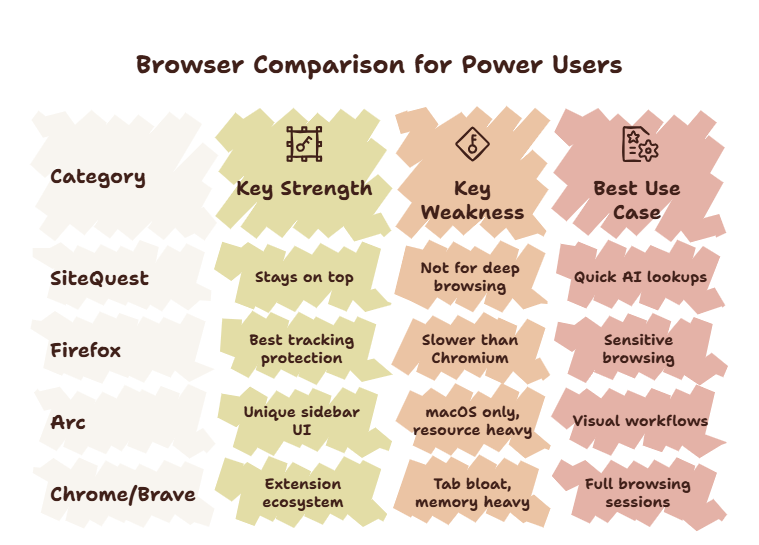
For a complete overview of all browser options, read our power user browser guide.
Final Thought
Brave makes browsing better. SiteQuest makes browsing disappear when you do not need it. The second is often more valuable.