You use AI every day. ChatGPT for brainstorming. Claude for writing. Perplexity for research. Github Copilot for code.
Your browser is your gateway to most of these tools. Which means your browser choice directly impacts how smoothly your AI workflow runs.
And most browsers are terrible for AI work.
You opened this article to find the best browser for AI. But first, you had to open Chrome, find the right tab, dismiss a notification badge, and remember which AI tool you wanted to use. Now you’re here. Reading this. While your AI answer waits in another tab.
Have you ever noticed that you spend more time navigating to your AI tools than actually using them?
The browser you choose determines how much friction exists between you and every AI interaction.
Curious what that friction costs you? Try the Focus Points Calculator — it measures how much of your day gets eaten by unnecessary context switching.
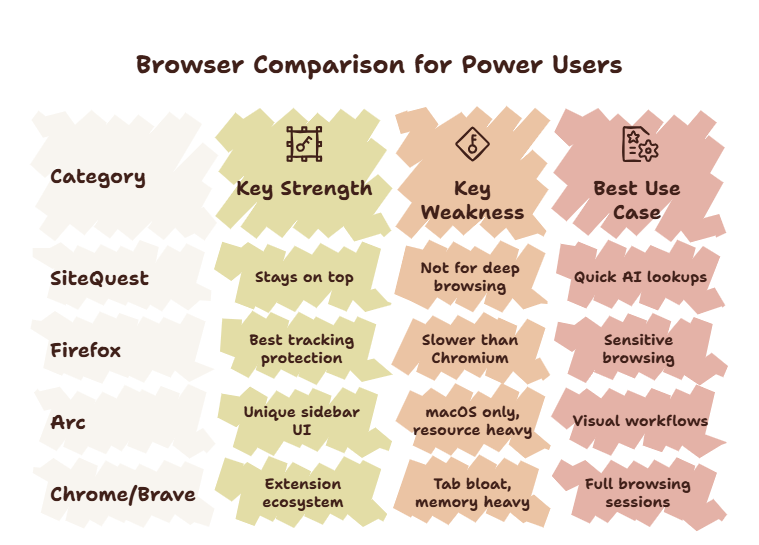
The AI Browser Requirements
Here is what an AI-friendly browser needs:
- Quick summon — you should access AI tools in under one second
- Minimal distraction — no tabs, notifications, or bookmarks competing for attention
- Low resource usage — AI tools already use system resources; the browser should not add to it
- Context preservation — using AI should not force you to leave your current workspace
- Multi-model support — you use more than one AI tool; the browser should support switching between them
The Ranking
#1 — SiteQuest (Overlay Browser)
SiteQuest is the best browser for AI users because it was built for this specific use case.
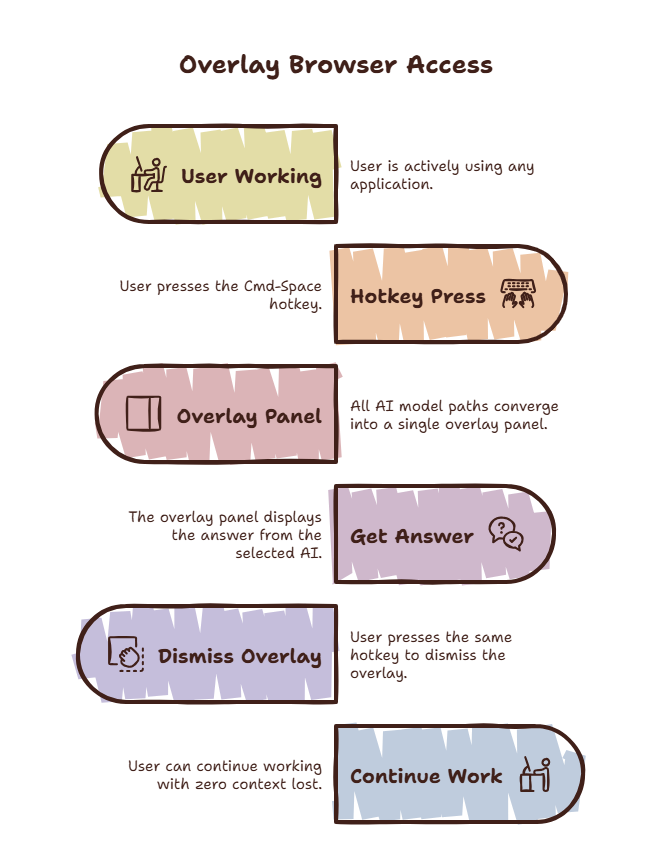
Press Shift-Space. A floating overlay appears over your current workspace. Inside it, you can use any web-based AI tool — ChatGPT, Claude, Gemini, Perplexity, Copilot. When you are done, press the hotkey again. The overlay disappears.
You never left your workspace. You never opened a new tab. You never saw a distraction.
The overlay approach eliminates the two biggest costs of AI access: context switching and distraction. SiteQuest is also lightweight — it runs only when summoned, consuming no background resources.
Best for: Anyone who uses AI tools multiple times per hour. Developers, writers, researchers, designers.
#2 — Arc
Arc is the most innovative traditional browser. Its Spaces and Profiles features let you separate your AI tools from your personal browsing. The split view is useful for keeping AI visible alongside your work.
The downside is that Arc is still a full-window browser. You must leave your current application to use it. The learning curve is also real — Arc’s interface is dramatically different from Chrome.
Best for: People who want a more organized Chrome-like experience and are willing to invest time in learning a new interface.
#3 — Firefox
Firefox is solid for AI work. It is lighter than Chrome, respects privacy, and supports all major AI tools.
The limitation is the same as every traditional browser. Full-window. Tab management. Context switch cost. Firefox also lacks the quick-summon capability that makes overlay browsers so effective for frequent AI access.
Best for: Privacy-conscious AI users who do not mind the context switch cost.
#4 — Chrome
Chrome works. Every AI tool supports it. The extension ecosystem means you can add AI helpers.
But Chrome is the worst option for frequent AI access. Memory bloat slows your system. Tabs accumulate. The new tab page distracts. Chrome is designed for engagement — which is the opposite of what you need when reaching for AI.
Best for: AI users who are not ready to switch and value compatibility above all else.
Why Overlay Wins for AI
The overlay approach is not just slightly better for AI access. It is fundamentally better.
Think about what happens when you use AI through a traditional browser:
- You leave your work
- You find the browser window
- You navigate to the AI tool
- You see your other open tabs
- You suppress distractions
- You ask your question
- You read the answer
- You switch back to your work
- You rebuild context
With an overlay browser:
- Press hotkey
- Ask question
- Read answer
- Press hotkey
- Back to work
Three steps instead of nine. No environment switch. No distraction suppression. No context rebuild.
For a deeper dive into this workflow, read our guide on how to use AI efficiently.
The Multi-Model Workflow
Heavy AI users do not use one model. They use several. ChatGPT for one task. Claude for another. Perplexity for research.
An overlay browser supports this naturally. Bookmark all your AI tools in the overlay. Press the hotkey. Select the tool you need. Use it. Dismiss. Next time, select a different tool.
The overlay becomes your AI launcher. A single surface for every AI tool you use. No tabs. No windows. No switching cost.
For a practical setup guide, read our post on using ChatGPT and Claude together.
The SiteQuest Perspective
SiteQuest was designed from the ground up for AI-heavy workflows. A lightweight overlay browser that makes every AI tool one hotkey away. No tab management. No distraction. No context switching. The best browser for AI users is the one you barely notice using.
Final Thought
The best browser for AI is the one that gets out of the way between you and the answer.