You sit down to write a report. You open the document. Type two sentences. Then you remember you need a number from an email.
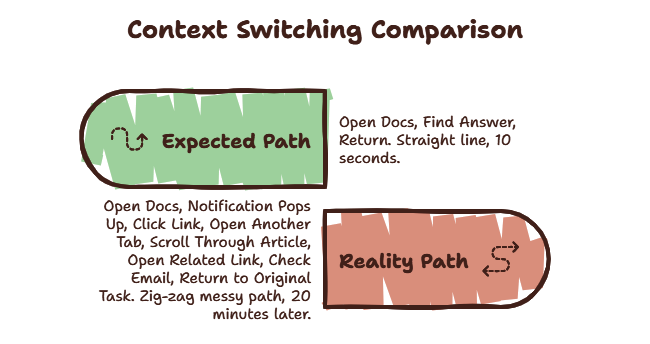
You switch to your inbox. You find the number. But there’s a message from your manager marked urgent. You open it. It’s not urgent — but now you’re thinking about that project. You switch back to your document.
You stare at the blinking cursor.
What was I writing again?
You opened this article to understand context switching. But first, you had to switch contexts to find this article. Now you’re here. Reading this. While three other tabs wait for your attention.
You spend three minutes re-reading your own work to remember where you left off. By the time you get back into flow, you’ve lost ten minutes. And this happened three times in the last hour.
This is the real cost of context switching. And it’s probably happening to you right now without you noticing.
What Is Context Switching?
Context switching is the act of shifting your attention from one task to another. A CPU does the same thing — it saves the state of one process and loads another. It costs CPU cycles. Your brain works the same way, except the cost is significantly higher.
Every time you leave one task for another, your brain must:
- Save the current mental model (where you were, what you were doing, what comes next)
- Load a new mental model (what this new task needs)
- Suppress the previous context so it doesn’t interfere with the new one
The average knowledge worker switches contexts every three minutes. According to a 2026 UC Irvine study, only 2% of people can actually multitask. The rest of us are just switching rapidly and paying for it every single time.
Have you ever noticed how you can read the same paragraph three times after switching back to something?
That’s not you being bad at reading. That’s your brain still processing the last task.
The 23-Minute Recovery Rule
This is the number that changes how you think about interruptions.
Researcher Gloria Mark from UC Irvine spent years studying how people actually work. Her finding: after a single interruption, it takes an average of 23 minutes and 15 seconds to fully return to the original task. This is not a guess. This is measured data.
The interruption itself might last thirty seconds. A notification pops up. You glance at it. You respond. Quick. The problem is what happens next. Your brain lingers on the interruption. You think about it while trying to re-enter your original work. You lose your place.
You read the same paragraph three times.
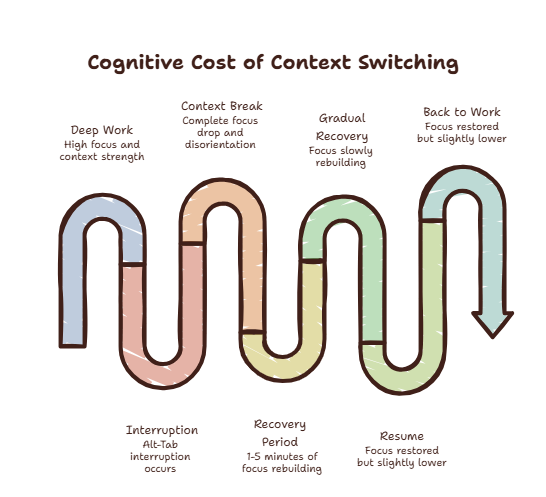
Most people think the cost of an interruption is the interruption itself. It’s not. The cost is the recovery. And recovery takes longer than you think.
Curious what your context switching cost actually is? Try the Focus Points Calculator — it measures how much of your day gets eaten by task switching.
The Four Types of Context Switches
Not all context switches are equal. Some are obvious. Some happen so fast you don’t even notice them.
External Interruptions
Someone walks to your desk. A notification pings. Your phone buzzes. These are forced switches. You have no control over when they happen.
The average knowledge worker receives 56 interruptions per day according to RescueTime’s 2026 report. 78% of them are low-priority. They could wait. But you respond immediately because responding feels productive.
Self-Interruptions
This is the dangerous one.
You’re working. You hit a small roadblock. You need to check one thing. You open a browser tab. Ten minutes later, you’re reading about something completely unrelated.
You did this to yourself.
Self-interruptions feel justified. You tell yourself you’re making progress. You’re not. You’re paying the context switch tax voluntarily. This is the most expensive type because there’s no external force to blame. It’s just your brain chasing the path of least resistance.
Task Shifting
You spend thirty minutes on Project A, then move to Project B for a meeting, then return to Project A. Each shift costs you that 23-minute recovery window. If you switch between three projects in a day, you might never actually do deep work on any of them.
Tool Switching
You leave your code editor to check documentation. You leave your design tool to check specs in Notion. You leave your writing app to research in a browser.
Tool switching is the quiet one. It feels like you’re still working on the same task. But every time your eyes move from one application to another, your brain has to reorient. You’re not making progress — you’re just moving.
Why It Costs More Than You Think
There’s a concept called attention residue.
When you switch from Task A to Task B, part of your brain stays focused on Task A. This leftover attention — attention residue — reduces your cognitive capacity for Task B. You can’t fully engage with the new task because your brain is still processing the old one.
Research from Carnegie Mellon found that attention residue can reduce performance on complex tasks by up to 40%. That’s not a small effect. That’s the difference between high-quality work and average work.
The more complex the original task, the heavier the residue. Creative work, complex coding, strategic thinking — these leave the most residue. Checking email leaves almost none.
This is why switching from deep work to email feels easy, but switching back to deep work feels almost impossible.
Common Solutions That Don’t Work
When people realize they’re drowning in context switches, they usually throw hardware or productivity hacks at it.
More Monitors
You add a second or third screen so you can keep everything visible. This often just multiplies your distraction surface area. Instead of one screen with focused work, you now have three screens competing for your attention.
Every glance to the side triggers a micro-context switch.
Tab Managers
Browser extensions that organize your tabs make you better at organizing tabs. They don’t reduce how many times you leave your primary task. They just make the leaving slightly more organized.
Time Blocking
Scheduling your day into blocks assumes you can predict when interruptions will happen. Real work doesn’t work that way. You hit a problem, you need an answer. Time blocking doesn’t help with the micro-switches that happen dozens of times per day.
These solutions fail because they try to organize interruptions instead of eliminating the environmental transition that triggers them.
A Better Way To Think About It
The goal isn’t fewer tools. The goal is less disruption.
The fundamental problem with context switching is the environmental transition. You leave your workspace to find information in a different environment. Then you return. Every single time.
The most effective fix is not to stop looking up information. That’s impossible in 2026. The fix is to bring the information to your current workspace so you never leave.
Instead of treating every micro-question as an excuse to tear down your visual context and build a new one, what if the information came to you?
For a deeper comparison of this approach, see our article on overlay vs split screen.
Practical Fixes
If you want to start lowering your context recovery cost immediately:
-
Batch your micro-questions. When a small question pops up, write it down. Answer all of them in a single five-minute batch later.
-
Use keyboard-first tools. The faster you can bring up and dismiss information, the lower the switch cost. Hotkeys are faster than mouse navigation. Significantly faster.
-
Keep your context visible. Your brain holds context better when it can still see your primary work. If you must switch, don’t completely hide your main workspace.
-
Reduce your tool surface area. Every application you have open is a source of potential switches. Close what you don’t need.
For more practical techniques, read our guide on how to reduce app switching and stop context switching.
The SiteQuest Perspective
This exact problem is why SiteQuest exists. Not because the world needed another browser. Because the world needed a way to access information without breaking focus. A pop-in overlay that brings the web to your current app — so you never have to leave it.
Final Thought
Every interruption costs more than the interruption itself. Protect your mental working memory like your throughput depends on it — because it does.