You have two monitors. Maybe three. You keep your code on one screen and your browser on the other. This is the dream setup, right?
So why do you still feel distracted?
You glance at the second monitor. You see your browser. You see your open tabs. You see a notification badge. You see a tab you left open from yesterday. You look back at your code. But your brain has already registered everything on that second screen. It takes a moment to refocus.
You opened this article to compare overlay browsers vs split screen. But first, you had to glance at your second monitor, see something interesting, and drag your attention back here. Now you’re here. Reading this. While your second screen silently competes for your focus.
Now imagine your browser is not visible at all. It is behind a hotkey. You press it, the browser appears briefly, you find what you need, you press the hotkey again, and the browser disappears. Your code never left your visual field.
That is the difference between split screen and an overlay browser.
The Split Screen Illusion
You set up multiple monitors and split screens because it looks productive. It signals to yourself and others that you are serious about efficiency. But the reality is different.
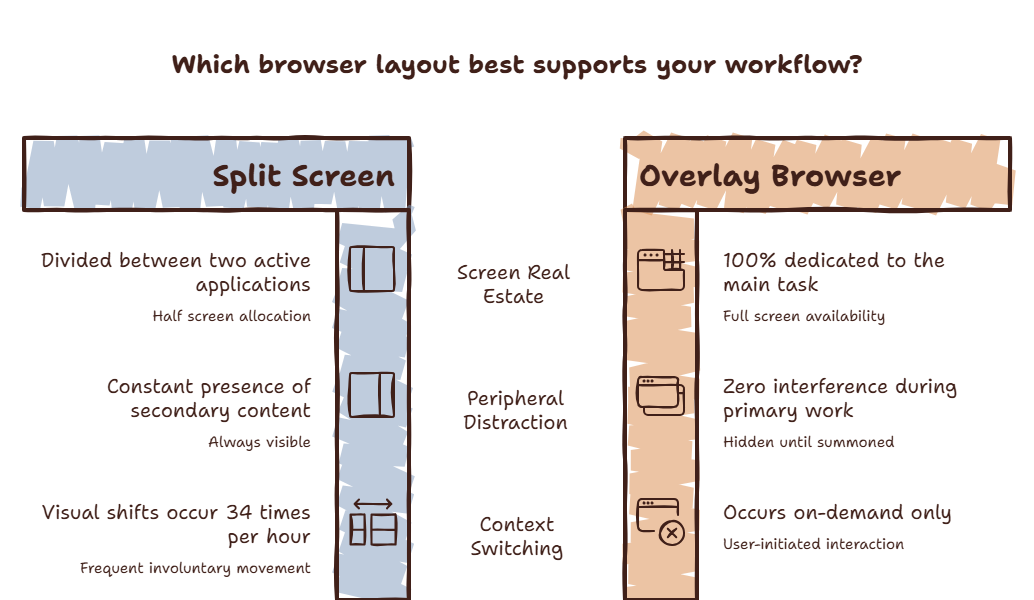
Split screen solves one problem: it lets you see two applications at the same time. But it creates three new problems:
Problem 1: Reduced screen real estate for your primary task. Your code editor, design tool, or document is now squashed into half a screen. You spend more time scrolling, zooming, and resizing. The tool that should be your focus becomes harder to use.
Problem 2: Constant peripheral distraction. The second application is always in your field of view. Your brain cannot help but register movement, changes, and content on that second screen. Every notification badge, every loading spinner, every interesting headline pulls a micro-fragment of your attention.
Problem 3: The false sense of security. You think you are being efficient because the information is visible. But visible does not mean processed. Your brain is still context switching between the two visible applications — it just happens faster because both are in your visual field. The cost is lower but still present.
Have you ever noticed how you look at your second monitor, see something interesting, and spend thirty seconds reading it before remembering you were supposed to be working?
That is not a discipline problem. That is split screen working exactly as designed — keeping information in your visual field where it can capture your attention at any moment.
Curious what those peripheral glances cost you? Try the Focus Points Calculator — it measures how much of your day gets eaten by split-screen distraction.
How an Overlay Browser Solves These Problems
An overlay browser takes a different approach. Instead of keeping the browser permanently visible, it keeps it hidden until you explicitly need it.
The overlay is summoned by a hotkey. It appears as a sidebar on top of your current application. You find what you need. You press the hotkey again. It disappears.
Your primary application always gets the full screen. Your editor, design tool, or document uses 100% of your display. You are not squashing your primary workspace to make room for a secondary one.
The browser is not visible when you are not using it. There is no peripheral distraction. No notification badges calling for your attention. The browser does not exist until you summon it.
You control when the switch happens. The browser does not compete for your attention. It waits until you need it.
When Split Screen Makes Sense
Split screen is not always bad. There are specific situations where it is the right choice:
Comparing two documents side by side. If you are actively comparing content from two sources, split screen is faster than switching. The comparison is the task, and split screen supports it.
Monitoring live data. If you need to watch a dashboard, a terminal output, or a live feed while working, keeping it visible makes sense.
Video calls with notes. Having your video call on one side and your notes on the other is practical.
For everything else — documentation lookups, AI queries, quick searches, reference checks — an overlay browser is more effective because it does not force your primary task to share screen space.
The Real Cost of Split Screen
A 2025 study from the University of Waterloo found that people working on split-screen setups switched their visual focus between screens an average of 34 times per hour. That is more than once every two minutes. Each switch added 4-7 seconds of refocus time.
At 34 switches per hour and 5 seconds of refocus each, that is nearly three minutes per hour of pure refocus time — not counting the cognitive cost of processing the content on the second screen.
An overlay browser reduces this because the browser is not visible when you are not using it. You cannot be distracted by something you cannot see.
Which Setup Is Right for You
| Task | Best Setup |
|---|---|
| Active comparison of two documents | Split screen |
| Monitoring live data | Split screen |
| Documentation lookups | Overlay browser |
| AI assistant queries | Overlay browser |
| Quick reference checks | Overlay browser |
| Video calls with notes | Split screen |
| Research with multiple sources | Split screen |
Most knowledge workers need both. Use split screen for tasks that genuinely require simultaneous visibility. Use an overlay browser for everything else.
The SiteQuest Perspective
SiteQuest was built because split screen is not the answer to context switching. Split screen organizes the interruption. SiteQuest eliminates it. A pop-in overlay that appears when you need it, disappears when you do not, and keeps your primary workspace full and focused.
Final Thought
Split screen makes you feel productive. An overlay browser makes you actually productive. The difference is what you cannot see versus what you cannot ignore.