You have seen the people who seem to get ten times more value out of AI than everyone else.
They write faster. They research deeper. They code smarter. They produce more in a morning than most people produce in a week.
And they are using the same models you are.
Same ChatGPT. Same Claude. Same Gemini. Same Perplexity.
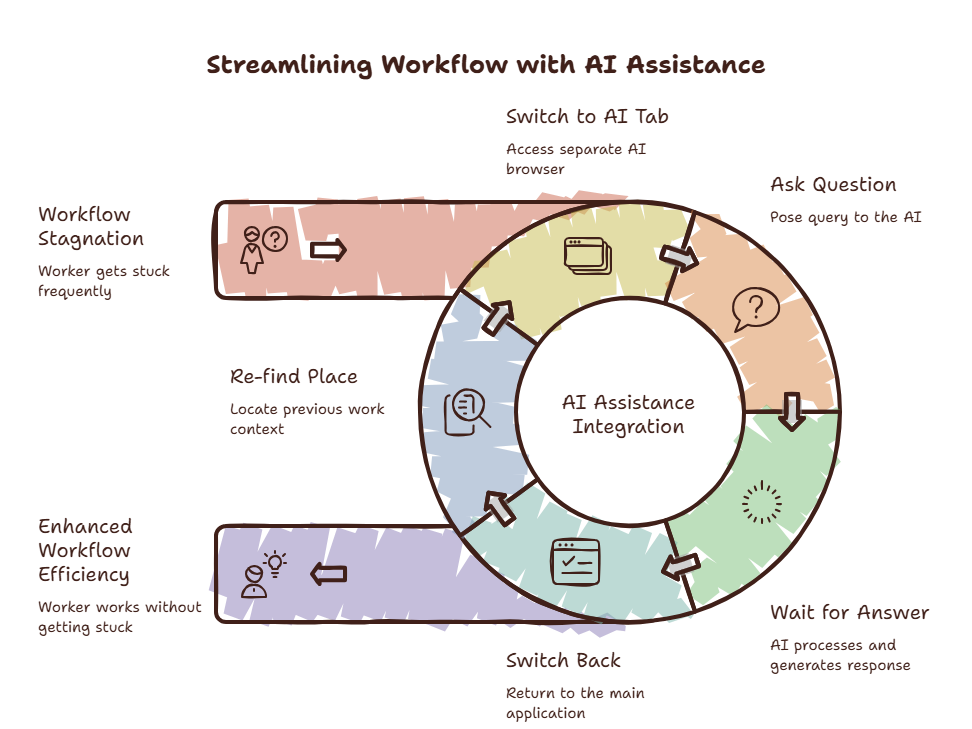
You opened this article to learn how heavy AI users work. But first, you had to switch to a browser tab to find it. Now you’re here. Reading this. While your cursor blinks in another app.
The Heavy User Pattern
It is not about better prompts. It is not about knowing more model features. It is about access frequency.
Heavy AI users do not use AI five times a day. They use AI fifty times a day. Or a hundred. AI is not a destination they visit. It is a tool embedded in their workflow.
The difference is not the quality of the response. It is the cost of asking.
A 2025 survey from the AI Productivity Lab tracked 1,200 knowledge workers across industries. The top 10% of AI users accessed AI tools an average of 47 times per workday. The bottom 50% accessed AI tools 6 times per day.
The heavy users reported 3.4x higher productivity gains. Not because their responses were better. Because they asked more questions.
Have you ever noticed that you sometimes choose not to ask AI because it feels like too much effort?
You have a question. You know AI could answer it. But opening a browser tab, navigating to the tool, and typing the question feels like breaking your flow. So you guess instead.
The heavy user never guesses. They ask.
Curious what skipping those questions costs you? Try the Focus Points Calculator — it measures how much of your day gets eaten by the friction of accessing your tools.
The Access Frequency Threshold
There is a threshold. Below it, AI is an occasional helper. Above it, AI becomes a workflow multiplier.
The threshold is about friction.
When accessing AI takes ten seconds and a context switch, you will only use it for important questions. The small, quick questions — the ones that would save you the most time — get skipped.
When accessing AI takes one second and no context switch, you use it for everything. The syntax question. The definition check. The second opinion. The quick brainstorm. All of those small moments add up to massive productivity gains.
Heavy users have crossed this threshold. They have found a way to access AI that is so fast, so frictionless, that they never hesitate to ask.
How They Access AI
One Surface, All Models
Heavy users do not open ChatGPT in one tab and Claude in another. They access all models from a single surface. An overlay browser like SiteQuest — summonable with Shift-Space — that contains all their AI tools.
One hotkey. One surface. All models.
No Tab Management
Heavy users do not manage AI tabs. They do not close ChatGPT when they are done. They do not search through open tabs to find the right AI tool. The overlay appears when needed and disappears when not. No tab state to manage.
Embedded in Workflow
Heavy users do not “take a break to use AI.” AI is embedded in the workflow. It flows alongside the work. The overlay appears, the question is asked, the answer is received, the overlay disappears. The work never stops.
For a full breakdown of this workflow, read our guide on how to use AI efficiently.
The Compound Effect
The compound effect is what makes heavy users unstoppable.
Each AI query gives them a small advantage. A syntax answer saves thirty seconds. A brainstorm session saves five minutes. A code generation saves an hour. Individually, these gains are small. Accumulated over fifty queries per day, they are transformative.
The heavy user does not produce better work because they are smarter. They produce better work because they ask more questions. And they ask more questions because the cost of asking is near zero.
The Shift
Becoming a heavy user does not require learning new prompting techniques or mastering AI features. It requires changing your access method.
Switch from browser-tab access to overlay access. Reduce the friction. Increase the frequency. The skill will follow the access.
SiteQuest is the tool that makes this shift possible. A pop-in overlay browser that makes AI access as fast as a reflex. No friction. No context switch. Just faster answers, more frequently.
For a comparison of all access methods, read our best browser for AI users roundup.
Final Thought
Heavy AI users are not better at AI. They are just better at reaching it.