You are working on something that requires focus. A report. Some code. A design. You hit a wall and need AI to get unstuck.
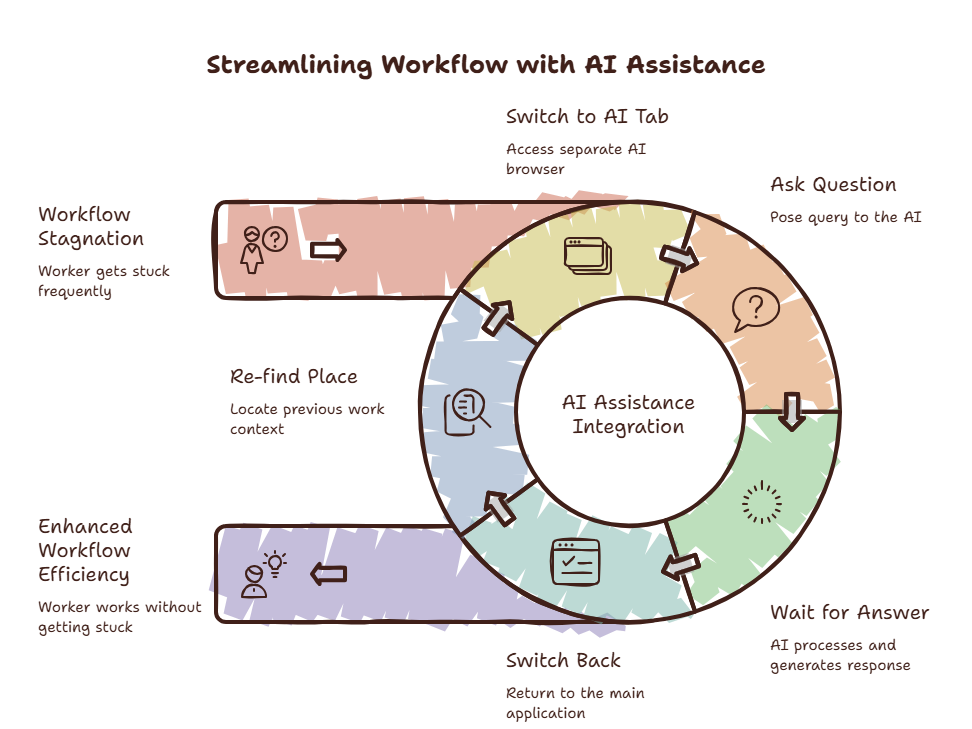
You open ChatGPT in a browser tab. You ask your question. You read the answer. You switch back to your work.
Then you stare at your screen.
What was I doing?
You re-read your work. You find your place. You restart. Five minutes later, you hit another wall. You open ChatGPT again. The cycle repeats.
You opened this article to learn how to use AI efficiently. But first, you had to switch to a browser tab — maybe even ChatGPT itself — to find this page. Now you’re here. Reading this. And your previous context is already fading.
Most people use AI in a way that costs more focus than it saves.
The tools are fast. The interaction pattern is broken.
The Efficiency Paradox
AI tools promise speed. And they deliver — on the response. The model answers in seconds. The problem is everything around the answer.
You pay for a fast AI model. Lightning fast inference. Then you spend more time switching contexts, finding your place, and rebuilding focus than you do actually using the AI.
A 2025 study from Microsoft found that knowledge workers switch between apps an average of 1,200 times per day. Not 1,200 productive switches. 1,200 moments where your brain must save one context and load another. Each one costs seconds. Sometimes minutes.
Have you ever noticed that AI feels slow even when the response comes back instantly?
That lag is not the model. It is the context switch you do not see.
Curious what 1,200 switches per day cost you? Try the Focus Points Calculator — it measures how much of your day gets eaten by context switching.
Why The Browser Tab Is Costing You
The browser tab is the default AI access pattern. It is the worst one.
Here is what happens when you open an AI in a browser tab:
- You leave your current application completely
- You enter the browser environment — full of other tabs, bookmarks, notifications
- Your brain registers everything visible on the screen
- You suppress the urge to check that email, that headline, that tab you left open
- You ask your AI question
- You read the answer
- You switch back to your application
- Your brain spends time rebuilding the previous context
The switch itself takes three seconds. The context recovery takes one to five minutes. And because the recovery is invisible — you do not see it as a cost — you never measure it.
A report from RescueTime estimated that the average worker loses 21.8 hours per month to context switching recovery. More than half a work week. Gone. Not from the work itself. From the act of switching.
What Does Not Work
Most advice about AI efficiency misses the point.
“Use the ChatGPT desktop app.” The desktop app is better than a browser tab. But it still opens as a separate window. Your primary workspace disappears. You still context switch. You just do it from a slightly different launcher.
“Use keyboard shortcuts.” Keyboard shortcuts make the switch faster. Faster switching is still switching. The cost is not the three seconds it takes to press Alt-Tab. The cost is the minutes of recovery afterward.
“Batch your AI questions.” Save up all your questions and ask them at once. This works in theory. In practice, you will forget half the questions and miss the timely answers. Batching reduces switching frequency at the cost of reduced utility.
“Use a second monitor.” A second monitor for AI tools keeps them visible. Visible content competes for your attention. A study from the University of Utah found that visual distractions in your peripheral vision reduce cognitive performance by up to 10%. The AI tool becomes a persistent distraction.
What Actually Works
The solutions that work share one thing in common: they eliminate the environment switch, not just reduce its speed.
Method 1: Overlay Browser
An overlay browser keeps your AI accessible without leaving your current workspace. Press a hotkey. A sidebar appears over your current application. Ask your question. Press the hotkey again. The sidebar disappears. Your workspace is exactly where you left it.
No environment switch. No context recovery.
SiteQuest is built on this principle. Shift-Space. The AI overlay appears. You interact. It disappears. Your focus never breaks.
For a detailed comparison, read our post on using ChatGPT without switching tabs.
Method 2: Editor-Integrated AI
If you spend most of your time in VS Code, JetBrains, or another code editor, editor-integrated AI is your best option.
VS Code extensions for ChatGPT, Claude, and GitHub Copilot render the AI panel inside your editor. Your code stays on screen. The AI appears beside it. You never leave.
This works well for developers. It works less well if your workflow spans multiple non-editor applications — design tools, documents, spreadsheets, terminals.
Method 3: Dedicated AI Desktop Apps
ChatGPT and Claude both offer native desktop apps. Better than browser tabs because they can be summoned with a global hotkey.
The limitation is that they still open as separate windows. Your primary application hides behind them. When you dismiss the AI window, you return to your workspace — but your brain still registers the window change.
Desktop apps are a solid mid-tier solution. Better than browser tabs. Not as seamless as an overlay.
Method 4: Multiple AI Models — Combined
This is where power users separate themselves.
Most people use one AI tool. ChatGPT or Claude. They switch between them by opening multiple tabs or windows. This doubles the switching cost.
The efficient approach is to layer your AI tools in a way that lets you access all of them from a single surface. An overlay browser can do this — you keep ChatGPT, Claude, and Gemini as bookmarks in the overlay. One hotkey, multiple models.
For a full breakdown, read our guide on using ChatGPT and Claude together.
The 80% Rule
The tool that saves you 80% of your time is useless if it breaks your focus 100% of the time.
A fast AI model that requires a full context switch every time you use it is not making you more efficient. It is trading focus for speed. And focus is harder to rebuild than speed is to gain.
SiteQuest was designed around this principle. An overlay browser that keeps your AI tools one hotkey away. No environment switch. No context recovery. Just faster answers without the cost.
Final Thought
The fastest AI is the one you reach without reaching.
Stop measuring your AI efficiency by response time. Start measuring it by how much context you preserved.