You press Alt-Tab. You switch to your browser. You check one thing. Three seconds. You press Alt-Tab back.
You are staring at your screen.
What was I doing?
You re-read the last paragraph. You re-check the file name. You re-scan the code. Ten seconds pass. Thirty seconds. You find your place and continue.
This happens dozens of times per day. It feels normal. It is not normal. It is a cognitive failure mode that your brain was never designed to handle.
You opened this article to understand why you forget after switching. But first, you had to switch apps to find this page. Now you are here. Reading this. And you have already started forgetting what you were doing before.
Context Dumping
When you switch away from a task, your brain does not store a perfect backup of your mental state. It dumps the context to free up resources for the new task. When you return, it must reload — and the reload is never clean.
Your brain works differently from a computer. A computer saves a complete state when you switch processes. Registers, memory addresses, stack pointers — everything. The restore is exact.
Your brain does not do this. It uses a mechanism called goal neglect. When a goal is not actively maintained in working memory, it degrades. The longer you are away, the more it degrades. Even three seconds is enough for measurable decay.
A 2025 study from the Attention Research Group at the University of British Columbia found that task-switching for as little as 2.8 seconds caused a measurable increase in goal neglect. Participants returned to their primary task with reduced accuracy and slower response times — even when the switch was to a trivial, unrelated task.
Have you ever noticed that you sometimes return from a switch and your hands still know what to do, but your conscious mind is blank?
That is procedural memory intact, declarative memory gone. Your fingers remember. Your brain does not.
The Three-Second Lie
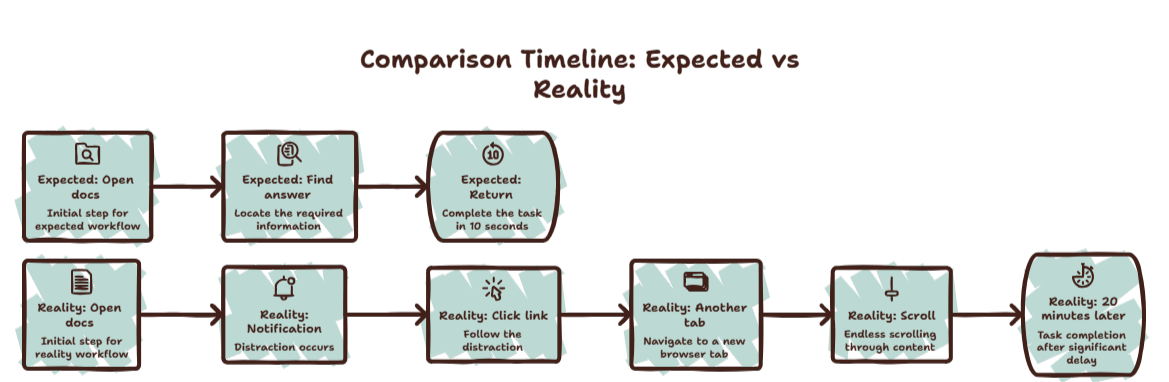
We tell ourselves that a quick switch costs nothing because it only takes three seconds.
This is wrong in two ways.
First, the switch itself is not three seconds. It is three seconds of active switching plus one to five minutes of context recovery. The recovery is just invisible.
Second, the cost compounds. Every switch reduces your available cognitive bandwidth for the rest of the session. Even after you recover context, your brain is slightly depleted. The next switch costs more. The next recovery takes longer.
By the end of the day, you have switched apps hundreds of times. Each switch was three seconds. But the accumulated cost is measured in hours of lost productivity.
Curious what those hundreds of switches cost you? Try the Focus Points Calculator — it measures how much of your day gets eaten by context switching recovery.
Why Memory Fails
The specific mechanism behind context dumping is called proactive interference.
When you learn something new (the content of the tab you just switched to), it interferes with what you already learned (your previous task context). The interference is bidirectional. The new content makes the old content harder to recall. And when you switch back, the old content interferes with the new.
Your brain is not designed for rapid context switching. It is designed for sustained attention on one task. The modern workflow — switching apps every 52 seconds — is biologically unnatural.
The Fix
The most effective fix is to switch less. But that is easier said than done when your workflow requires information from multiple sources.
The practical fix is to change how you switch.
Use an Overlay, Not a Window
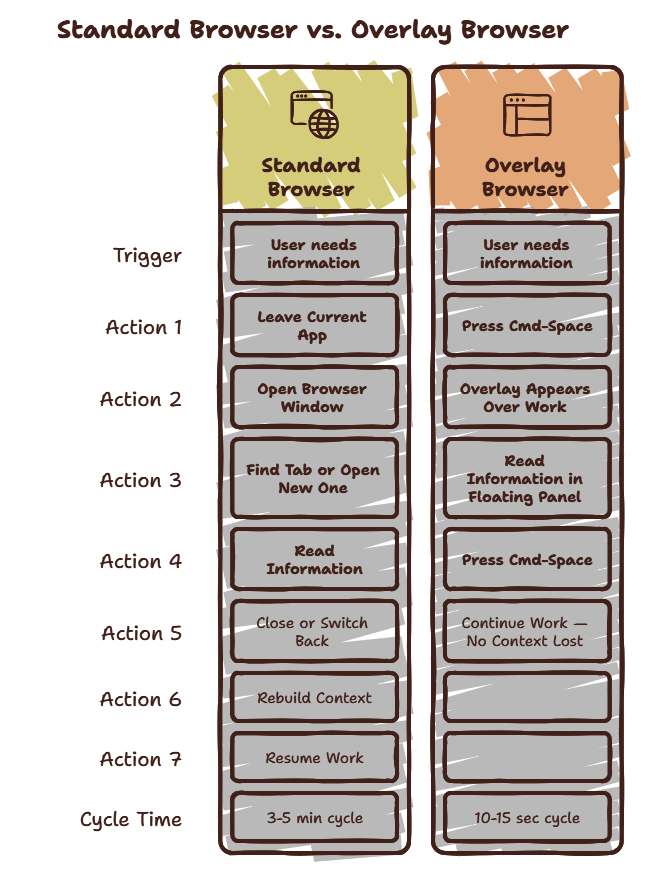
When you switch to a full application window, your visual environment changes completely. Your brain must process an entirely new scene. That is what triggers context dumping.
An overlay browser like SiteQuest changes this. When you summon it, your primary workspace stays visible behind it. Your brain does not register a complete environment change. The overlay is a layer on top of your work, not a replacement for it.
The context dumping is significantly reduced because your brain never fully releases the primary task.
Verbalize Before Switching
Before you switch, say out loud what you are doing. “I am adding error handling to the login function.” This act of verbalization strengthens the memory trace. When you return, the verbal cue helps your brain reload the context faster.
Leave Visible Cues
Before switching, leave a visible marker. A commented line in your code. A highlighted sentence in your document. A note on a sticky note widget. The visual cue acts as a context reload trigger when you return.
The SiteQuest Perspective
SiteQuest was built on the insight that context dumping is not a personal failure — it is a design failure of how we access information. An overlay browser preserves your visual workspace, reducing the cognitive shock of context switches. Your brain never fully releases the primary task because the primary task never fully disappears.
Final Thought
You are not forgetting because you are bad at focusing. You are forgetting because your tools force your brain to dump context every time you need information.