You are writing an email. Mid-sentence, you remember something you need to check. Your hand moves to the mouse. You open a new tab.
The email sits unfinished.
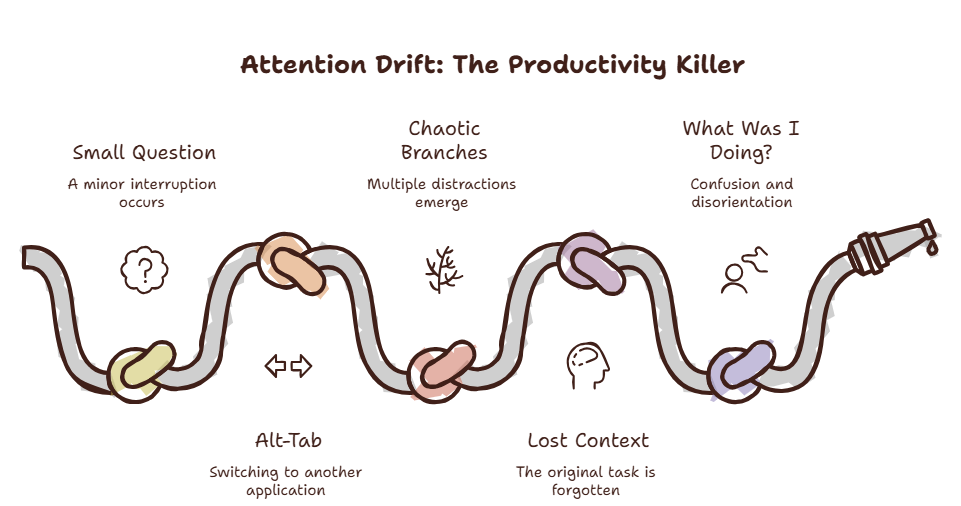
An hour later, you have seventeen tabs open. The email is still unsent. You have watched three YouTube videos, checked Twitter twice, and started a Slack conversation you did not need to have.
You opened this article to understand the Tab Reflex. But first, you had to open a new tab to find it. Now you’re here. Reading this. And that other tab is still waiting for you.
What happened?
You did not decide to do any of those things. Your hand moved before your brain caught up.
The Tab Reflex
It is the automatic, unthinking response to any micro-interruption: open a new tab.
Your brain learns this reflex through repetition. Every time you encounter uncertainty, friction, or boredom, you reach for a new tab. The action is faster than conscious thought.
The Tab Reflex is a trap. The new tab feels like progress. It feels like you are addressing the interruption. You are not. You are fragmenting your attention.
A 2025 study from the Cognitive Science Lab at Stanford found that habitual tab-openers check an average of 4.2 new tabs before returning to their original task. And 68% of the time, the original task was never completed in that session.
Have you ever noticed that you open a tab, read for thirty seconds, close it, and cannot remember what you just read?
That is the Tab Reflex operating below conscious awareness. Your brain opened the tab because of habit, not intent.
Curious what the Tab Reflex is costing you? Try the Focus Points Calculator — it measures how much of your day gets eaten by unconscious tab-opening habits.
Why The Reflex Exists
The Tab Reflex exists because your brain craves closure.
When you encounter a question, an uncertainty, or even a slightly boring moment, your brain registers a gap. An open loop. The open loop creates tension. Your brain wants to close it.
The fastest way to close it is to seek information. Open a tab. Find an answer. Close the loop.
Most tabs do not close loops. They open new ones. You search for one thing, find a related thing, search for that, and suddenly you are researching something completely unrelated.
The loop never closes. It multiplies.
The Cost
Each tab comes with a small cognitive price tag.
The visible cost is the tab itself. It sits in your tab bar. Uses memory. Demands attention.
The invisible cost is attention residue. Even after you close a tab, your brain retains a trace of its content. That trace competes with your current task for mental bandwidth.
A University of California study measured attention residue and found that switching between tasks leaves a measurable cognitive footprint that persists for up to 15 minutes. Every tab you open and close is a small scar on your focus.
The Fix
The fix is not willpower. Willpower is a limited resource, and the Tab Reflex is automatic.
The fix is changing the trigger.
Interrupt the Reflex
The Tab Reflex happens so fast that you cannot catch it in the moment. You must interrupt it before it starts.
One approach is to use an overlay browser like SiteQuest. Instead of opening a new tab in your main browser (where your reflex wants to go), you press a hotkey. A sidebar overlay appears. You look up what you need. You dismiss it.
The overlay does not add a tab to your browser. It does not create attention residue. It appears, serves its purpose, and disappears. Your main workspace remains untouched.
This breaks the reflex cycle. Your brain learns that interruptions do not require a new tab. They require a quick lookup, nothing more.
Batch Your Lookups
When you feel the urge to open a tab, write down the thought instead. A piece of paper. A notes app. A quick text file.
At the end of the hour, review your list. Most of the items will no longer seem urgent. Many will seem irrelevant. The ones that matter — address them in one focused session.
Batching reduces the frequency of the reflex. And frequency is what makes the reflex strong.
Create Friction
The Tab Reflex thrives on speed. The faster you can open a tab, the stronger the reflex.
Add friction. Remove the browser from your dock. Use a text expander that makes you type a confirmation before opening a new tab. Set a ten-second rule — wait ten seconds before opening any new tab.
The friction gives your conscious brain time to catch up. Ten seconds is enough to ask: Do I actually need this?
The SiteQuest Perspective
SiteQuest was designed with the Tab Reflex in mind. An overlay browser that is always one hotkey away — but never creates a new tab. The reflex still works — your brain still reaches for information. But the cost drops to zero. No new tab. No attention residue. No fragmented focus.
Final Thought
The Tab Reflex is not a weakness. It is a habit that can be rewired. The tab is the problem. Not the need for information.