Standard browsers are designed for everything. Tabs for work. Tabs for shopping. Tabs for social media. Tabs for news. Tabs for email. Tabs for AI assistants. Left open, minimized, hidden behind other windows, they act as a constant source of background noise.
Every time you see a tab for something other than your current task, your brain registers it. You might not click it. The recognition alone consumes cognitive bandwidth.
You opened this article to learn what a workflow browser is. But first, you had to open your regular browser — tabs and all — to find this page. Now you are here. Reading this. And the tabs are still there, waiting.
Have you ever noticed how you feel slightly overwhelmed just looking at your browser’s tab bar?
That is not your imagination. Every tab is a pending context switch waiting to happen.
Curious what your tab bar is costing you? Try the Focus Points Calculator — it measures how much of your day gets eaten by tab clutter and background noise.

The Browser Paradox
Your browser is your most powerful tool and your most persistent source of distraction — at the same time. It contains everything you need to work and everything that keeps you from working.
The problem is not the browser itself. The problem is that the browser was designed as a destination. You travel to it. You leave your workspace to enter the browser’s world. Then you travel back.
A workflow browser flips this model. Instead of being a destination you go to, it becomes a tool that comes to you.
What Makes a Workflow Browser Different
A workflow browser changes the fundamental relationship between you and information.
It stays in its place. A workflow browser does not take over your screen. It occupies a defined space — typically a sidebar — and stays there until summoned.
It is hotkey-driven. You never reach for a mouse to open it. A single keyboard shortcut brings it into view and dismisses it.
It is purpose-limited. A workflow browser is not for browsing YouTube or reading news. It is for quick lookups, AI queries, and reference checks. This limitation is a feature, not a bug.
It respects your context. When you dismiss a workflow browser, your primary workspace is exactly as you left it. No tabs to close. No windows to rearrange. Your visual context is preserved.
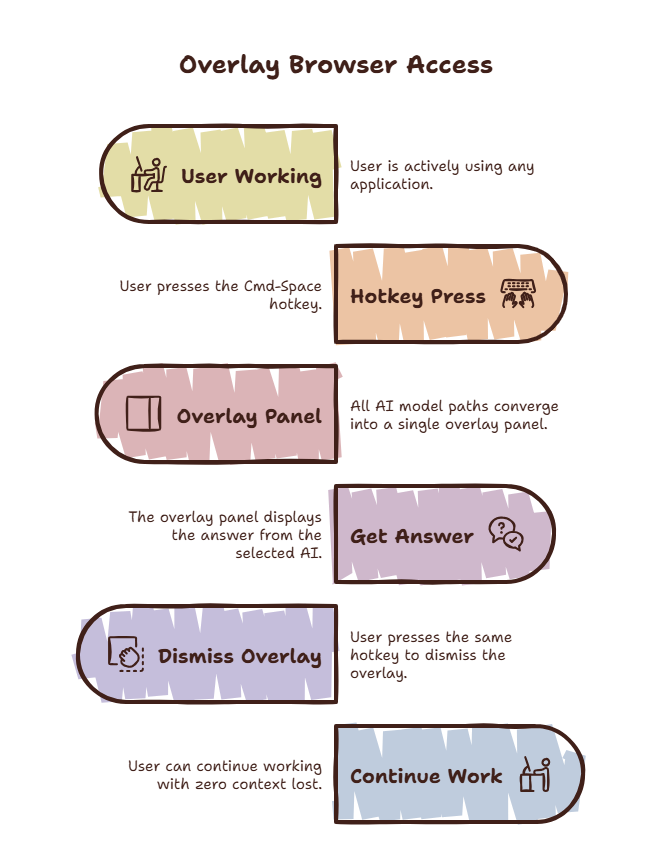
SiteQuest is built on this model. It runs as a lightweight overlay. Summon it with Shift-Space. It appears over your current app. It disappears when you are done.
How It Changes Your Day
The difference between a standard browser and a workflow browser is subtle in the moment but dramatic over a full day.
Standard workflow: You are coding → hit a question → Alt-Tab to Chrome → see 15 open tabs → find the one you need → read → Alt-Tab back → re-read your code to remember where you were → continue.
Each cycle takes 30-90 seconds. Do it 50 times a day, and you have lost an hour to switches alone — not counting the recovery time.
Workflow browser workflow: You are coding → hit a question → press Shift-Space → sidebar opens → type your query → get the answer → press Shift-Space → sidebar closes → continue.
Each cycle takes 10-15 seconds. Your editor never disappeared. Your brain did not lose context. There is no recovery cost.
Who Benefits Most
Developers reference documentation constantly and ask AI assistants about syntax and debugging. Every switch to a browser breaks flow. A workflow browser keeps your editor in view. See our guide on overlay browsers for developers.
Designers switch between their design tool, design systems, reference images, and communication tools constantly. A workflow browser reduces these switches by keeping references accessible without leaving Figma.
Writers and researchers need to fact-check and look up sources while writing. A workflow browser lets you research without leaving your document. Your draft stays visible, keeping your context active.
AI power users who use ChatGPT, Claude, or Gemini regularly are switching tabs dozens of times per day. A workflow browser brings all of these into a single overlay that follows you everywhere.
The One Trade-Off
A workflow browser is not a replacement for your main browser. It is a complement. When you need deep research, multiple sources side by side, or video tutorials, you still need a full browser window.
The workflow browser handles the micro-tasks that make up 80% of your browser usage. The main browser handles the remaining 20%. This distinction is the key to making both work effectively.
The SiteQuest Perspective
SiteQuest was built because the current model — where every application is a separate island and switching between them is your responsibility — was designed in the 1980s. It has not been updated for AI assistants, cloud documentation, and constant information access. A workflow browser is the first step toward a better model: one where information comes to you instead of you going to it.
Final Thought
The distance between a question and its answer should be measured in keystrokes, not application switches.