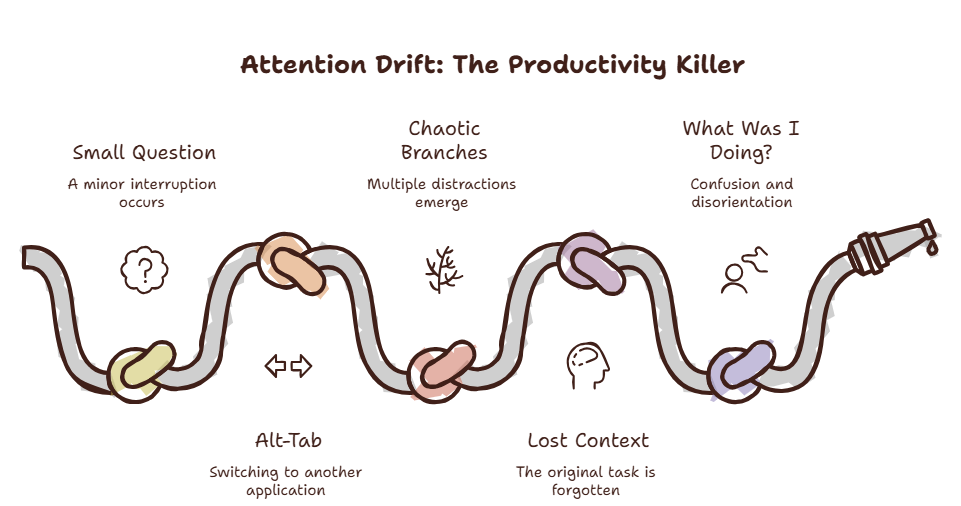
You need to check one thing. A configuration value. A definition. A quick fact.
You open a new tab. You type your search. You click the first result.
The page loads. There is a link in the first paragraph. It looks interesting. You open it in a new tab. You read the first page. There is another link. You open that too.
Twenty minutes later, you have seventeen tabs open. You are reading about something completely unrelated to what you started with. You close the tabs — most of them. You go back to your original task.
What was I doing?
You opened this tab to check one thing. Now you’re here. Reading this. With seventeen other tabs waiting for your attention.
This is not a discipline problem. It is a design problem.
The Link Spiral
Every link is a potential tangent. One tangent leads to another. Before you know it, you are in a completely different topic from where you started.
The Link Spiral is not accidental. It is engineered.
Web pages are designed to keep you clicking. Links are placed strategically. Related articles. Recommended reading. Sponsored content. Every element is optimized to extend your session.
A 2025 analysis by the Digital Attention Project found that the average article contains 4.7 internal links. Clicking one leads to another article with 4.7 more links. After three clicks, you are in a different content ecosystem entirely.
The worst part is that the Link Spiral feels productive. You are reading. You are learning. You are following your curiosity. But you are not doing the thing you intended to do.
Have you ever noticed that you open a tab to check a work email and end up reading a Wikipedia article about 14th-century agriculture?
The path is always the same: work → tangential thought → search → interesting article → another interesting article → completely unrelated content.
Curious how much time the Link Spiral costs you? Try the Focus Points Calculator — it measures how much of your day gets eaten by tab accumulation and context switching.
Why It Happens
The Link Spiral exploits a cognitive vulnerability called curiosity gap.
When you see a link, your brain registers an information gap. You know there is something behind the link, but you do not know what. The gap creates tension. Your brain wants to close it.
Clicking the link closes the gap. But the new page contains new gaps. The cycle repeats.
Your brain is not designed to resist curiosity gaps. It is designed to explore them. This was a survival advantage when information was scarce. It is a liability in an environment of infinite information.
The Fix
The Two-Click Rule
Before you open a new tab, ask: “Will this help me complete my current task in two clicks or fewer?” If the answer is no, do not open it.
The two-click rule forces you to evaluate whether a link serves your intent or just your curiosity. Most links fail this test.
Overlay Browsing
Use an overlay browser like SiteQuest for quick lookups. The overlay has no tab bar. You cannot open links in new tabs. You cannot accumulate tabs.
The overlay forces focus. You find what you need and dismiss it. The Link Spiral cannot start because the environment does not support it.
The Intent Check
Before opening a link, state your intent out loud: “I am opening this to find the configuration value for the API endpoint.” The act of verbalizing makes the goal concrete. When the link leads you astray, the verbal cue helps you notice.
The SiteQuest Perspective
SiteQuest was built to stop the Link Spiral. A focused browser overlay with no tab accumulation. Use it for quick lookups and AI access. The spiral cannot start because the tabs cannot multiply.
Final Thought
The best way to avoid 17 tabs is to never open the second one.