You’re writing a complex function. Everything is clicking. The logic is flowing. You hit a line where you need to check the syntax of a method you don’t use often.
You could guess. You could write it wrong and debug later. Or you could ask AI.
Just one question. Quick.
You opened this article to find the fastest way to access AI while coding. But first, you had to leave your editor, open a browser, find this article, and re-focus on what you were reading. Now you’re here. Reading this. While your code compiles in another window.
But to ask it, you have to leave your editor. You press Alt-Tab. The browser loads. You navigate to ChatGPT or Claude. You type the question. You get the answer. You press Alt-Tab back.
And just like that, the flow is gone.
Your cursor blinks at you. You re-read the last three lines. You re-check the variable names. It takes a full minute to get back to where you were — if you’re lucky.
Curious how much that flow loss costs you per day? Try the Focus Points Calculator — it measures how much of your day gets eaten by unnecessary context switching.
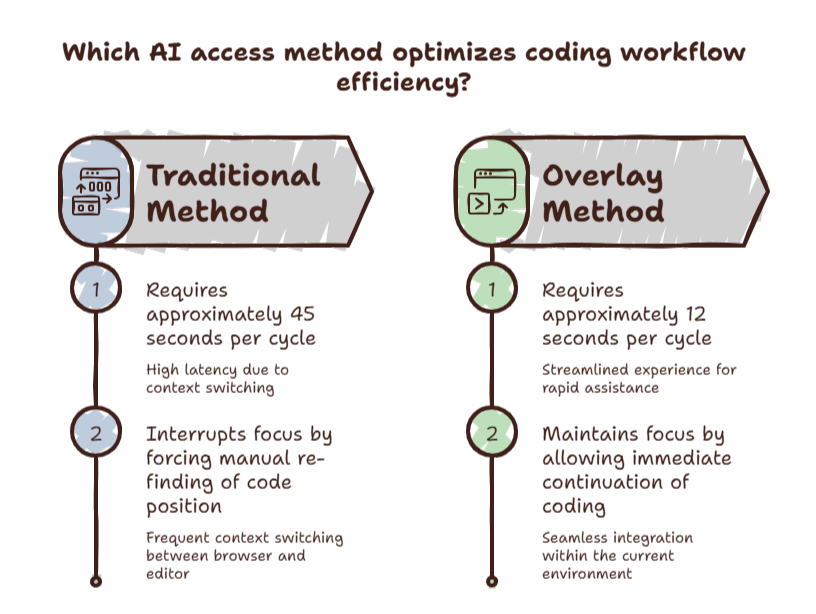
The Flow Friction Gap
The AI itself responds in two seconds. The access method — switching to a browser, navigating to the site, returning to your editor — takes thirty seconds. But it takes three minutes of context recovery to get back to where you were.
The AI is fast. The access is slow. And the gap between them is where your productivity disappears.
Here are the six methods ranked from slowest to fastest.
Method 6: Browser Tab
Open a browser. Navigate to ChatGPT. Type your question. Wait for the response. Copy the answer. Alt-Tab back. Re-read your code to remember where you were.
Time cost: 30-60 seconds per query, plus 2-5 minutes of context recovery.
This is the default method. It is also the most expensive. The cost isn’t the thirty seconds. It’s the broken flow that follows.
Method 5: Browser With a Bookmark
You save ChatGPT as a browser bookmark. You click it from your bookmark bar instead of typing the full URL.
Time cost: Slightly faster than Method 6. Marginally. The fundamental problem — leaving your editor — remains completely unsolved.
Method 4: Dedicated Desktop App
You install the ChatGPT or Claude desktop app. You summon it with a global hotkey. It opens as a floating window.
Time cost: 3-5 seconds to summon. No browser to navigate. But your editor is still hidden behind the overlay.
Desktop apps are better than browser tabs. They’re not the best option because they still hide your primary workspace. You still pay the context recovery cost.
Method 3: Terminal-Based AI Tools
You use a command-line tool like sgpt, aichat, or claude-code. You keep a terminal split open in your editor.
sgpt "Explain this regex: /^[A-Za-z0-9._%+-]+@/"Time cost: 2-3 seconds. The terminal is within your editor. You don’t leave the coding environment.
This is fast, but it requires terminal comfort and a split-pane setup. Not every developer keeps a terminal visible at all times.
Method 2: Editor Plugin
You install an AI chat plugin in VS Code. A sidebar panel opens within your editor. You type your question. The AI responds in the sidebar. Your code stays in the main panel.
Time cost: 1-2 seconds. You type the question using a hotkey. You never leave the editor.
Editor plugins are the best option if you spend 80% or more of your time in a single editor. They completely eliminate the environmental transition.
Method 1: Overlay Browser
An overlay browser like SiteQuest gives you access to ChatGPT, Claude, Gemini, documentation sites, and any web-based tool — without leaving your editor.
Press Shift-Space. A lightweight sidebar opens over your editor. Type your query. Read the answer. Press the hotkey again. The sidebar disappears. Your editor is exactly where you left it.
Time cost: Less than 1 second. The overlay is always running in the background. No application launch time. No window management. No context recovery.
The key advantage over editor plugins: the overlay works with any application. You can use it while coding in VS Code, designing in Figma, writing in Notion, or managing terminals. It follows you everywhere.
Why Speed Matters More Than You Think
A 2025 study found that developers with AI assistants access them an average of 14 times per hour during active coding.
Fourteen times per hour. The difference between a 30-second method and a 1-second method is 406 seconds per hour. That’s nearly seven minutes — every single hour.
Over a six-hour coding day: 42 minutes. Over a week: 3.5 hours. Over a month: 14 hours.
When the friction of accessing AI drops to near zero, you ask more questions. You verify more assumptions. You write better code. The fastest method doesn’t just feel better. It changes how often you use AI.
The SiteQuest Perspective
SiteQuest was built because the difference between a fast AI and a fast workflow is access. A two-second AI response is meaningless if it takes you thirty seconds to reach it. A pop-in overlay that keeps your tools one hotkey away — with zero context recovery cost.
Final Thought
The fastest AI is the one you can reach without lifting your fingers from the keyboard.