You are on a Mac. You value speed, privacy, and a clean experience. Ads undermine all three.
You opened this article to find the best ad blocker browser. But first, you had to scroll past 3MB of ads, trackers, and autoplay videos. Now you’re here. Reading this. While 14 scripts load in the background.
The good news is that you have options. The bad news is that most of them still operate within the same tab-and-window paradigm.
Here is the definitive ranking of ad blocker browsers for Mac in 2026.
Curious how much ads actually cost you in lost focus? Try the Focus Points Calculator — it measures how much of your day gets eaten by bloated pages and context switching.
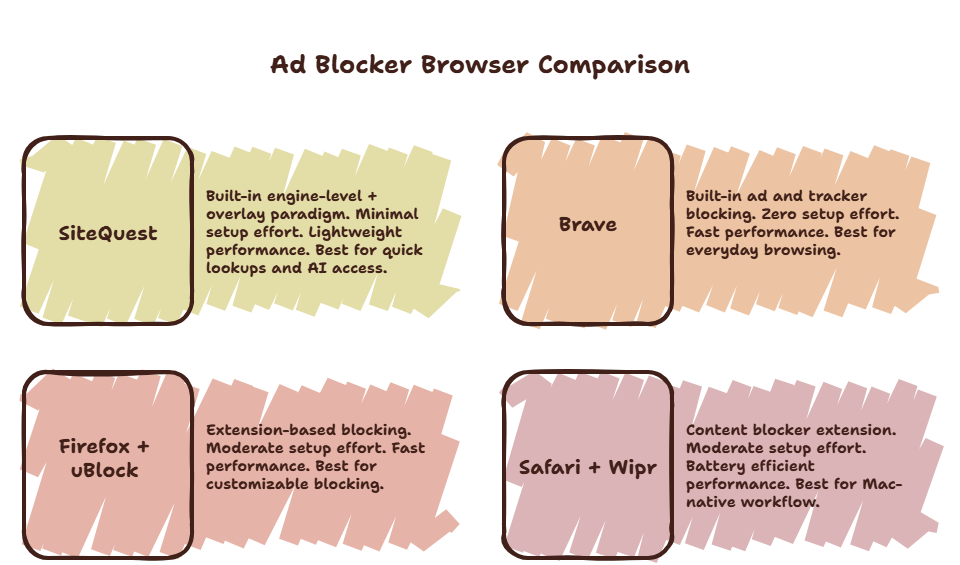
The Ranking
#1 — SiteQuest (Overlay Browser)
SiteQuest has a built-in ad blocker that blocks scripts and trackers at the engine level. Combined with the overlay paradigm — no tab bar, no bookmarks, no new tab page — the ad-heavy browser environment simply does not exist.
When you use SiteQuest, you are not browsing. You are accessing specific pages through a focused overlay. The built-in ad blocker handles the scripts. The overlay handles the environment.
Best for: Quick lookups, AI access, reference checks. Users who want to stop managing tabs and start focusing.
#2 — Brave
Brave is the best traditional browser for ad blocking on Mac. Built-in ad and tracker blocking. No extensions required. Pages load significantly faster than Chrome.
Brave also includes privacy features like fingerprinting protection and HTTPS upgrading. The downside is feature creep — Brave now includes crypto wallets, BAT rewards, and a VPN upsell.
Best for: Everyday browsing with zero ad blocker setup. Privacy-conscious users who want a Chrome-like experience.
#3 — Firefox with uBlock Origin
Firefox is a solid browser. Add uBlock Origin — the gold standard ad blocker extension — and you get excellent ad blocking performance.
Firefox also offers container tabs for separating work and personal browsing. It respects privacy better than Chrome or Brave.
The setup requires installing the extension. Not difficult, but not zero-effort like Brave.
Best for: Users who want full control over their ad blocking configuration. Privacy enthusiasts.
#4 — Orion
Orion is a lesser-known Mac browser that supports both Chrome and Firefox extensions. It uses WebKit for excellent performance and battery life.
Ad blocking works through extensions. The browser itself is lightweight and privacy-focused. The downside is a smaller ecosystem and fewer built-in features.
Best for: Mac users who want a lightweight, battery-efficient browser with extension support.
#5 — Safari with Wipr
Safari’s extension ecosystem has improved. Wipr is a lightweight, effective content blocker that works well.
Safari is efficient on battery and deeply integrated with macOS. But the extension ecosystem is limited compared to Chrome or Firefox. Advanced ad blocking configurations are harder to achieve.
Best for: Users who want a simple, battery-friendly setup and do not need advanced ad blocking features.
The Verdict
If you do most of your web browsing in a traditional browser, use Brave for the best zero-setup ad blocking experience.
If you want to fundamentally change how you interact with the web — eliminating the ad environment entirely for quick lookups and AI access — add SiteQuest to your workflow.
The two together cover every use case. Brave for browsing sessions. SiteQuest for quick access. No ads. No distractions.
Final Thought
The best ad blocker is not the one that blocks the most ads. It is the one that makes you forget ads exist.